
1. Accessing Your Booking
-
From the side menu, select Modules → smartPOOLCAR.
-
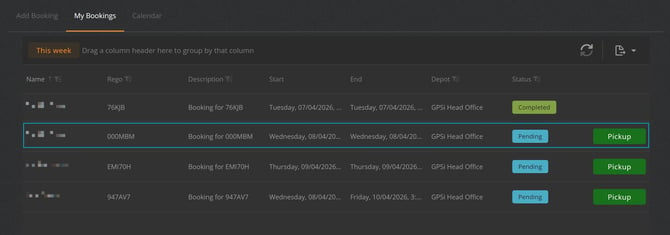
Open the My Booking tab.
-
Locate the booking you want to change or cancel and click on the vehicle row.
2. Changing a Booking
Select your booking to open the booking details panel.
- Pickup or return date and time
- Booking reason or comments
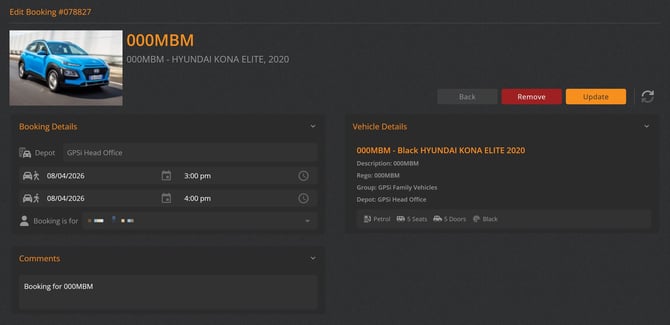
After making your changes, select Update to update the booking.
3. Canceling a Booking
If you no longer need the vehicle:
- Open the booking from the My Booking tab.
- Select Remove Booking.
- Confirm the cancellation when prompted.
Once cancelled, the booking is removed from the timeline and the vehicle becomes available for other users.
Good to Know
- Bookings can only be changed or cancelled before pickup.
- Once a vehicle has been picked up, the booking must be completed through the standard Drop‑Off process.
- Admin users may have additional permissions to modify bookings on behalf of others.
- A confirmation email is sent whenever a booking is changed or cancelled