
1. Picking Up via Email or My Bookings page
- When you’re ready to collect the vehicle, open the email or calendar event associated with your booking.
- Select the Pickup button
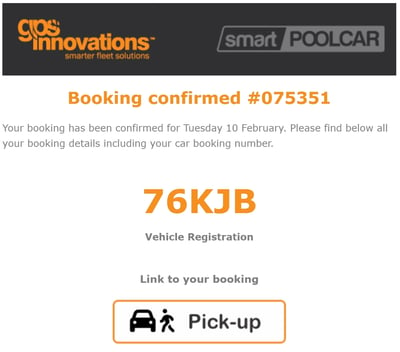
- You’ll be taken directly to the Pickup Vehicle popup.
2. Picking Up from the My Bookings Tab
- From the side menu, select Modules → smartPOOLCAR.
- Open the My Bookings tab and locate your booking.
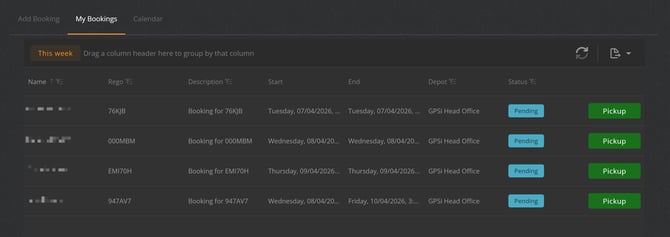
- Select the booking you wish to pick up.
- This will open the Pickup Vehicle page.
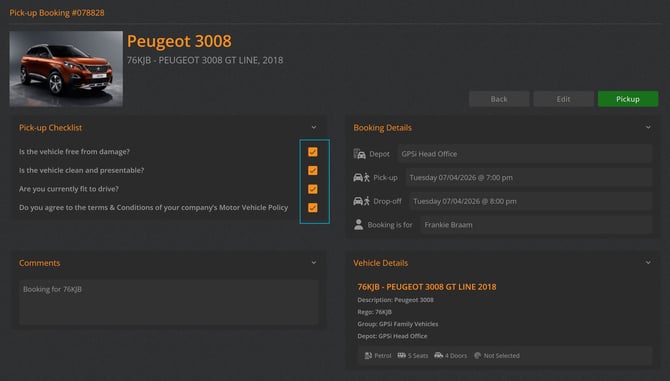
3. Completing the Pickup Form
Depending on your organisation’s configuration:
- Complete any required Vehicle Pre‑Check questions.
- If prompted, enter the current vehicle odometer reading.
- Select Accept to confirm the pickup
IMPORTANT
You must Drop Off your booking when you return the vehicle. If you don’t, the booking will stay open, the vehicle will remain unavailable for other users, and you may be assigned to any trips recorded in subsequent bookings.
What Happens After Pickup
-
The vehicle status updates to In Use.
-
You receive an email containing your Drop‑Off details and a calendar event
-
You can now drive the vehicle as needed until you return it through the standard drop‑off procedure
Good to know
If Assign Driver to Trips is enabled, any trips taken during the booking period after the vehicle has been picked up will be automatically assigned to the Driver listed on the booking.